Free Chrome Extension

Discover the hidden data
behind every photo

Right-click any photo on a website and instantly see the shutter speed, aperture, ISO, lens, histogram, and GPS location. Built by a photographer who loves both photography and technology.

✓ Free ✓ No account needed ✓ 100% private ✓ 9 languages

TS EXIF Reader in Chrome browser on MacBook

Everything a photographer needs

TS EXIF Reader shows you at a glance how a photo was technically made, without any hassle, uploads, or account.

📷
Full exposure data

Shutter speed, aperture, ISO, focal length, white balance, flash, exposure compensation, and more, displayed in clean, tappable cards.

📊
RGB Histogram

View the tonal distribution of any photo in an RGB histogram with luminosity curve. Instantly see whether a photo is over or underexposed.

🔭
Camera & lens recognition

The extension automatically recognises which camera and lens were used, including a product photo looked up via Wikipedia.

🌍
GPS location on map

If the photo contains GPS coordinates, the extension shows the exact location with a direct link to Google Maps.

🖱️
Right-click any photo

Right-click any image on any website, choose "Show EXIF data", and all information is immediately shown, no detours, no waiting.

📋
Copy to clipboard

Copy all EXIF data to your clipboard in one click, so you can easily paste it into a document or message.

See it in action

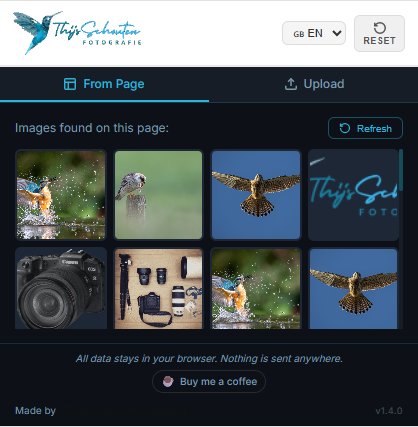
From Page tab
From Page tabBrowse all images on the current page and click one to read its EXIF data
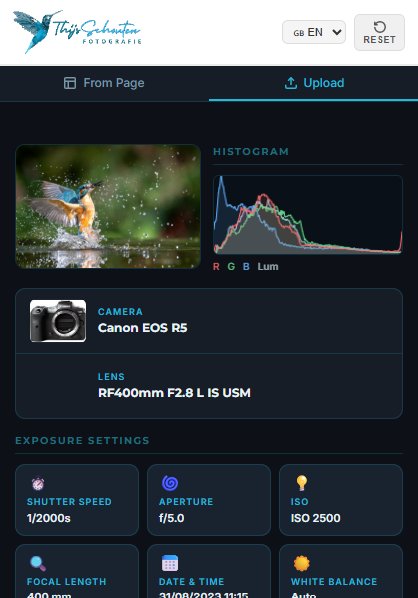
EXIF results
EXIF resultsCamera, lens, all exposure settings, histogram, and GPS, all in one clean view

Ready in three steps

1
Install the extension

Add TS EXIF Reader for free from the Chrome Web Store. No account, no password, no hassle.

2
Click on a photo

Right-click any photo on a website and choose "Show EXIF data". Or open the extension to pick an image from the page, or upload one from your computer.

3
View all data

Instantly see the shutter speed, aperture, ISO, camera, lens, histogram, GPS location, and all other EXIF information.

Works with all common photo formats

From everyday JPGs to RAW files from professional cameras, TS EXIF Reader reads them all.

JPG / JPEG
WebP
PNG
TIFF
HEIC / HEIF
CR2 / CR3
NEF
ARW
DNG
ORF
RW2
RAF

Your photos stay yours

I built TS EXIF Reader so your privacy is fully guaranteed. No fine print, no hidden uploads.

🔒

100% local processing

All EXIF data is read inside your own browser. Nothing is sent to any external server.

🚫

No uploads

Your photos are never uploaded or stored on any server, including mine.

👤

No account needed

No sign-up, no email address, no password. Just install and use.

🍪

No cookies or tracking

The extension places no cookies and tracks no usage whatsoever.

Want all the details? Read the full privacy policy

Thijs Schouten, fotograaf

Made by a photographer with a love for photography and technology

I'm Thijs Schouten, a wildlife and nature photographer with over 20 years of experience in the field. On my website thijsschouten.com I share everything I know about photography, from camera settings to the best locations for foxes and birds.

TS EXIF Reader is a tool I use every day myself. Whenever I come across a beautiful photo online, I want to know immediately how it was made: which camera, which lens, which shutter speed. With this extension I have that information in one click, and now you do too.

The extension is completely free. If you find it useful and want to support my work, a coffee via Buy Me a Coffee is always welcome!

Visit thijsschouten.com

Still have a question?

Yes! Via the "Upload" tab you can upload a photo directly from your computer. The extension reads the EXIF data locally, your photo never leaves your browser.
On most websites the right-click function works perfectly. Some websites block external access to their images via CORS security. In that case, you can always download the photo and upload it via the Upload tab.
Screenshots never contain EXIF data. Some websites strip metadata automatically (think social media). Photos taken with smartphones sometimes exclude GPS data when location permissions are disabled.
Canon (CR2, CR3), Nikon (NEF), Sony (ARW), Adobe (DNG), Olympus/OM System (ORF), Panasonic (RW2), and Fujifilm (RAF). For RAW files, use the Upload tab.
No, TS EXIF Reader is completely free. If you appreciate it, you can make a small contribution via the "Buy me a coffee" button, but that is absolutely not required!
The extension is available in 9 languages: Dutch, English, German, French, Spanish, Italian, Portuguese, Japanese, and Chinese. You can set the language via the flag menu in the top-right corner of the extension.

Don't see your question? Leave a comment on thijsschouten.com , I'll get back to you as soon as possible!

Is this photo real or AI-generated?

EXIF metadata is the fastest way to spot an AI image. Real cameras write a detailed technical fingerprint into every photo. AI generators almost never do.

📷
Real photo — has EXIF
  • Camera model and lens
  • Shutter speed, aperture, ISO
  • Exact date and time of capture
  • GPS coordinates (if enabled)
🤖
AI image — no EXIF
  • No camera, no lens, no settings
  • Empty or minimal metadata
  • File date matches today, not the scene
  • Round or impossible exposure values
Read the full guide: how to spot AI images with EXIF
Free, no account, 100% private

Ready to get started?

Add TS EXIF Reader for free to Chrome and discover the hidden data behind every photo you come across.

Install for free in Chrome Buy me a coffee